

If you work in business technology, you’ve heard the classic IVR thousands of times: “For technical support, dial 1. For check-in, dial 2.” That model is decades old. Today, the combination of Azure AI, language models such as GPT-4o, and real-time cloud services makes it possible to replace it with a conversational agent that understands natural language, queries real systems, and responds like a trained human. In this article, I break down how that is built end-to-end using the Microsoft ecosystem plus some complementary SaaS pieces.
Contents
- 1 Why now? The technological moment
- 2 The complete flow, layer by layer
- 2.1 Layer 1 — PSTN Input: Azure Communication Services
- 2.2 Layer 2 — Speech and language: Azure AI Speech + CLU + Translator
- 2.3 Layer 3 — Orchestrator: Bot Framework + Azure Bot Service
- 2.4 Layer 4 — Generative AI: Azure OpenAI + Azure AI Search (RAG)
- 2.5 Layer 5 — Backend Integrations: API Management, CRM, Database
- 2.6 Layer 6 — Observability and Security: Monitor, Entra ID, Purview
- 2.7 Layer 7 — Human Scaling: ACS + Microsoft Teams
- 3 Tech stack at a glance
- 4 Security patterns that cannot be missed
- 5 How much does it cost and when does it make sense?
- 6 Critical layer-by-layer security in the Voicebot architecture
- 6.1 Plane 1 — Network and perimeter security
- 6.2 Plane 2 — Identity and Access: Enter IDs, Managed Identities, and Role Matrix
- 6.3 Blueprint 3 — Secrets, Credentials, and Keys Management
- 6.4 How the three planes are connected: the complete security flow
- 6.5 What to put in the appsettings.json and what not to put
- 6.6 The Rule of the Three Key Vaults
- 6.7 Compliance checklist for audit
Why now? The technological moment
Three technologies matured at the same time and created this window:
Low-latency real-time speech-to-text. Azure AI Speech today recognizes speech with latencies of less than 300ms and accuracy of more than 95% in Spanish, English, and more than 100 languages. That was not commercially viable three years ago.
Language models as APIs. Azure OpenAI allows you to call GPT-4o via REST. Generative AI no longer requires in-house training: the universal model adapts to the business context with well-built prompts.
Azure Communication Services (ACS). Microsoft integrated the telco layer directly into Azure. A real phone number connected to your cloud logic, without physical PBX or proprietary telephony middleware.
Those three pieces together make the next-generation voicebot viable.
The complete flow, layer by layer
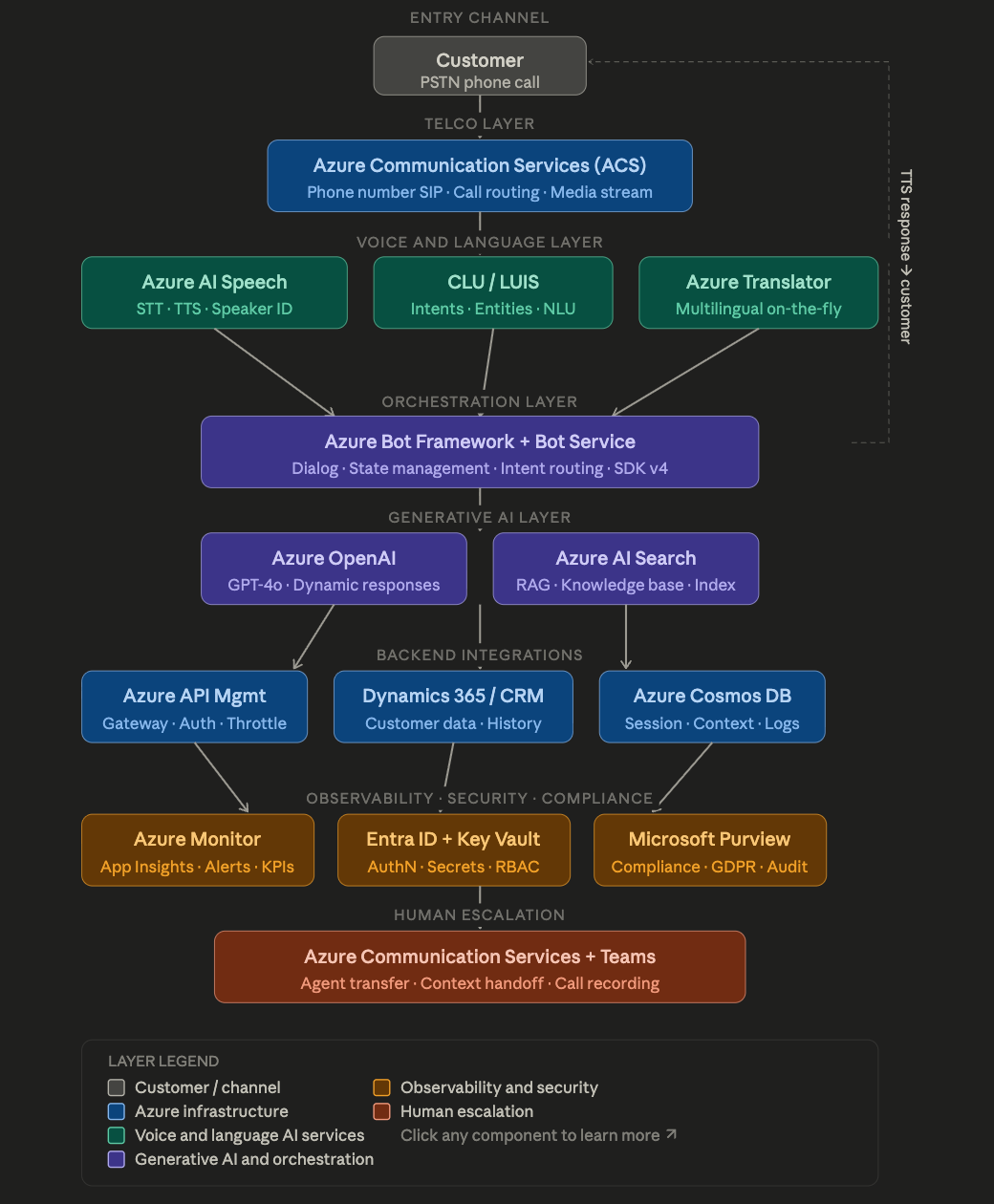
The diagram above shows all the layers. Here I go through them in detail.
Layer 1 — PSTN Input: Azure Communication Services
It all starts with a call. ACS gives you a real phone number (PSTN) that Azure routes directly as an audio stream. What’s critical here is that ACS exposes a WebSocket media streaming: the audio from the call arrives in real-time to your backend in 16kHz PCM chunks. No passing it through an external recorder or a third party telephony.
ACS also handles SIP trunking if you already have an existing PBX: you can redirect certain call queues to the voicebot without changing the entire telco infrastructure at once.
Layer 2 — Speech and language: Azure AI Speech + CLU + Translator
Audio arrives and enters three simultaneous services:
Azure AI Speech converts speech to text in real time (Speech-to-Text) and does the reverse path at the end: it converts the response to synthetic speech (Text-to-Speech). For TTS today there are neural voices in Spanish that sound completely natural. It also offers Speaker Identification: if the customer has already called before and given consent, the system can recognize their voice without them saying their name.
Conversational Language Understanding (CLU), the modern successor to LUIS, classifies transcribed text into intentsand extracts entities. For example: “I want to know the balance of my savings account” → intention consulta_saldo, entity tipo_cuenta = savings. This allows the bot to make deterministic decisions before calling GPT-4o, reducing costs and latency in predictable flows.
Azure Translator comes in when you detect that the client speaks in a different language than the one your bot is operating. A Latin American bank voicebot can receive a call in English, Portuguese, or Quechua without changing the backend.
Layer 3 — Orchestrator: Bot Framework + Azure Bot Service
This is the piece that ties it all together. Azure Bot Framework v4 is the dialog engine: it manages conversation status, turn flow, and short-term memory (what the user said two turns ago, what was already queried in the CRM).
The bot decides what to do with each intent received from CLU:
- High-trust intent and deterministic flow → directly executes the business logic.
- Ambiguous intent or complex query → delegate to Azure OpenAI for a generative response.
- Intent to scale with human → transfers the call.
Azure Bot Service is the managed hosting of the bot: it automatically scales, persists state, and connects to channels (in this case, the ACS telephony channel).
Layer 4 — Generative AI: Azure OpenAI + Azure AI Search (RAG)
This is where the bot stops sounding robotic. When the user asks a question that doesn’t fit into a predefined flow — “Can you explain what happens if I don’t pay my card on the last day of the business month?”, for example—the bot calls Azure OpenAI GPT-4o with:
- A system prompt that defines the assistant’s role, tone, and business constraints.
- The history of the current shift (last N messages).
- Context retrieved from Azure AI Search.
That third point is the RAG (Retrieval-Augmented Generation) pattern. Instead of asking the model to invent information, you first search in a vector database indexed with your actual documents: term contracts, FAQs, tariffs, internal procedures. Azure AI Search converts the user’s question into an embedding, searches for the most relevant documents, and injects them into the prompt. The model responds based on your data, not its generic training knowledge.
This solves the problem of hallucinations in business contexts and is key to regulatory compliance.
Layer 5 — Backend Integrations: API Management, CRM, Database
A useful voicebot needs real customer data, not just conversation.
Azure API Management acts as a central gateway for all calls to external systems. Manage authentication, throttling, payload transformation, and cache. If you change your CRM endpoint tomorrow, you only update APIM without touching the bot.
Dynamics 365 / external CRM (Salesforce, HubSpot, own system) delivers the customer’s context: name, interaction history, contracted products, open tickets. The bot may say “Hi Carlos, I see you have an open query since Monday”because APIM made the call to the CRM at the beginning of the call with the customer’s phone number as the lookup key.
Azure Cosmos DB stores distributed session state. Since the audio arrives as a stream and there can be multiple instances of the bot running in parallel, you need a fast, global, and schema-free store for the context of each active conversation.
Layer 6 — Observability and Security: Monitor, Entra ID, Purview
This layer is where many voicebot projects fail in production by ignoring it.
Azure Monitor + Application Insights captures traces of each conversational turn: STT latency, OpenAI latency, detected intents, escalations. You can build real-time dashboards and alerts: if the escalation rate to human agent exceeds 40%, something is wrong with the dialog model.
Microsoft Entra ID (formerly Azure AD) controls which systems can call which APIs within the architecture using Managed Identities. The bot never has hardcoded credentials – it gets short-lived tokens for each service. Azure Key Vault stores secrets that do need to be persisted (external system API keys, TLS certificates).
Microsoft Purview comes in for compliance: it records what customer data was accessed, by which service, and when. In regulated industries (banking, healthcare, telecommunications) this is not optional: GDPR, PCI-DSS and local regulations require full traceability of personal data processed on the call.
An important note here: customer calls contain voice as biometric data in many jurisdictions. If you implement Speaker ID, you need explicit consent and an on-demand speech embedding removal process.
Layer 7 — Human Scaling: ACS + Microsoft Teams
The best voicebot in the world does not solve 100% of cases. Scaling done right is what distinguishes a real architecture from a prototype.
When the bot decides to transfer, ACS makes a call transfer to the agent queue. The critical thing is not only to transfer the call, but to transfer the context: the agent receives in its interface (a contact center app integrated with Teams or Dynamics Customer Service) an automatic summary of what the customer has already explained, the CRM queries that have already been made and the intentions detected. The agent picks up without the customer repeating everything from scratch.
ACS can also activate call recording at that time, with automatic post-call transcription via Azure AI Speech for quality analysis.
Tech stack at a glance
| Function | Microsoft Technology | Integrable SaaS alternative |
| PSTN number + audio stream | Azure Communication Services | Twilio (via connector) |
| Speech-to-Text / TTS | Azure AI Speech | Google Speech-to-Text |
| NLU / Intentions | CLU (Azure Language) | Dialogflow CX |
| Generative AI | Azure OpenAI (GPT-4o) | — (Azure native) |
| Knowledge base RAG | Azure AI Search | Pinecone + embeddings |
| Orchestration | Azure Bot Framework v4 | — (Azure native) |
| CRM | Dynamics 365 | Salesforce, HubSpot |
| Session Database | Azure Cosmos DB | Redis Enterprise |
| API Gateway | Azure API Management | Kong, AWS API GW |
| Monitoring | Azure Monitor + App Insights | Datadog |
| Identity | Microsoft Enter ID | Okta |
| Compliance | Microsoft Purview | — |
Security patterns that cannot be missed
From a cybersecurity perspective, these are the non-negotiable controls:
Zero Trust in the control plane. All internal communications between layers use Managed Identities with granular RBAC. No component has admin permissions: the bot can only read from the CRM, not write, except for explicit endpoints.
Encryption in transit and at rest. The audio stream travels encrypted via TLS 1.3. Session data in Cosmos DB and logs in Monitor are encrypted with customer-managed keys in Key Vault (Customer-Managed Keys).
Sanitization of the input. The text transcribed by STT before passing it to OpenAI must pass through an injection filter. Although the attack surface of prompt injection in speech is smaller than in text (there is friction in speaking malicious payloads), it exists and must be mitigated with schema validation and Azure OpenAI content filters.
Data residency. If you’re processing European customer data, the entire architecture must be deployed in EU regions. ACS, Azure AI Speech, and Azure OpenAI are available in European regions with data residency guarantees confirmed in the Microsoft DPA.
How much does it cost and when does it make sense?
An architecture like this in minimum production (without multi-region high availability) costs between $800 and $3,000 USD per month depending on call volume, GPT-4o usage intensity, and ACS tier. From ~500 calls per day, the savings in human agents usually justify the investment.
The realistic implementation time for a functional MVP with a flow of 3-4 intents is 8-12 weeks with a team of 2-3 people (cloud engineer, bot developer, AI specialist).
The traditional IVR was a solution of its time. Today, the architecture I described is fully implementable with productive and mature Microsoft services, without research or experimental components. The important conceptual shift is that you no longer design decision trees: you design layers of language understanding, with generative AI as an intelligent fallback and real business systems as the source of truth.
The difference between a voicebot that frustrates and one that solves is in data integration and context transfer: the bot that knows who you are before you finish speaking, and when it transfers you to a human, everything it already knows happens to it.
Critical layer-by-layer security in the Voicebot architecture
This section is the indispensable complement. We’re not talking about “firewall-enable” here — we’re talking about concrete design decisions that determine whether your architecture withstands a security audit, complies with financial or health regulations, and survives a security incident without collapsing.
We divide it into three planes: network and edge, identity and access (IAM/Entra ID), and secrets and credentials management.
Plane 1 — Network and perimeter security
The first diagram shows how the network layers are segmented and which protocols run on each hop.
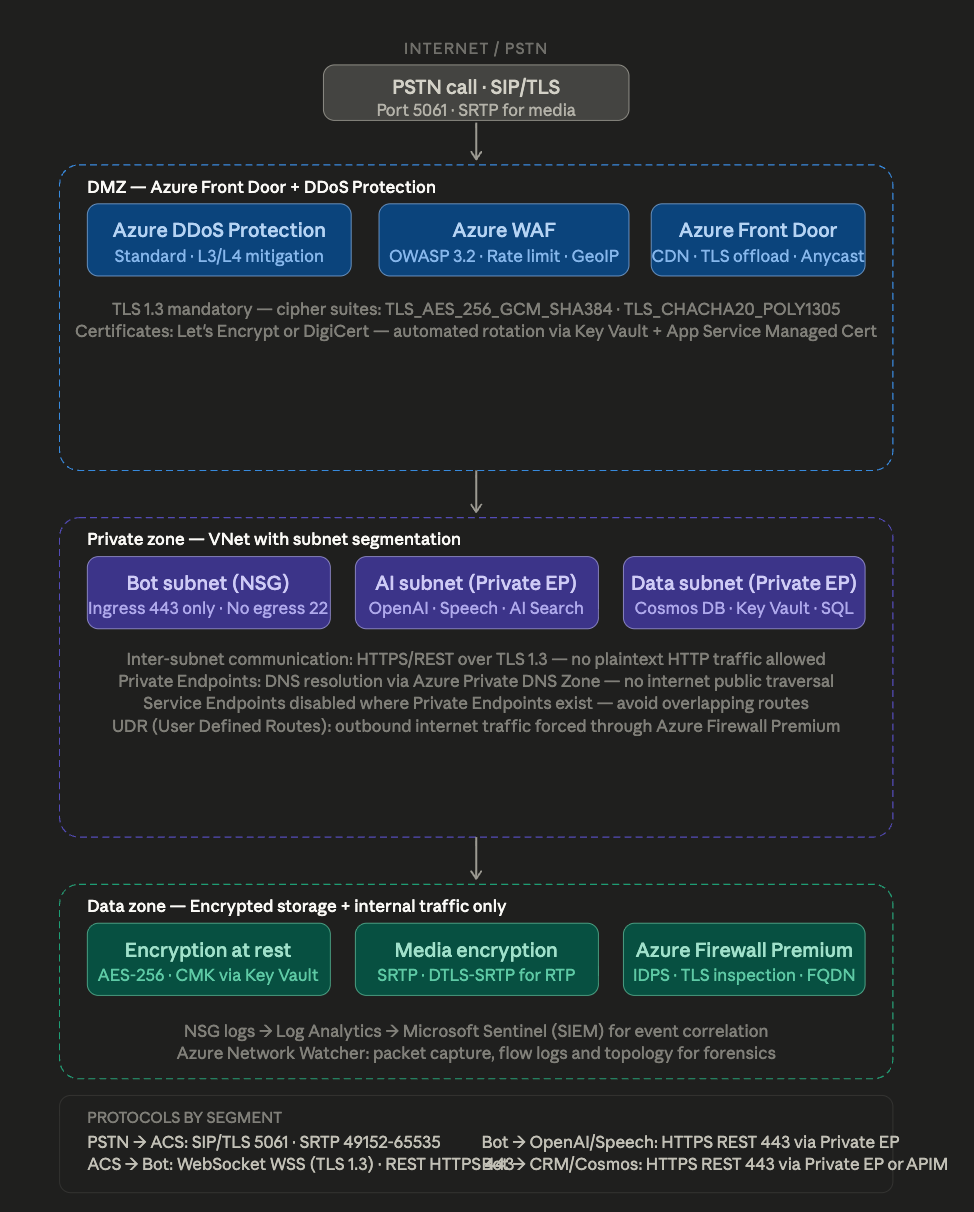
The network architecture is organized into three zones of decreasing trust from the outside in. Traffic never passes through an area without going through explicit control, and no internal service is directly accessible from the internet.
The most delicate point of the voicebot from a network perspective is the audio stream: RTP/SRTP runs over UDP in dynamic port ranges (49152-65535), which complicates stateful filtering. The solution is to delegate that traffic entirely to ACS, which handles it within its own Microsoft VNets. The bot never touches the UDP stream directly — it receives the audio already processed via WebSocket over TLS.
Azure Firewall Premium in IDPS (Intrusion Detection and Prevention) mode is the gatekeeper of outbound traffic from the VNet to the internet. This matters because the bot needs to call external APIs (the CRM can be on-premises or in another cloud). Without that firewall, any compromised instance of the bot could exfiltrate data to arbitrary destinations.
Plane 2 — Identity and Access: Enter IDs, Managed Identities, and Role Matrix
The second diagram shows how authentication flows between components and how the identity hierarchy is structured.
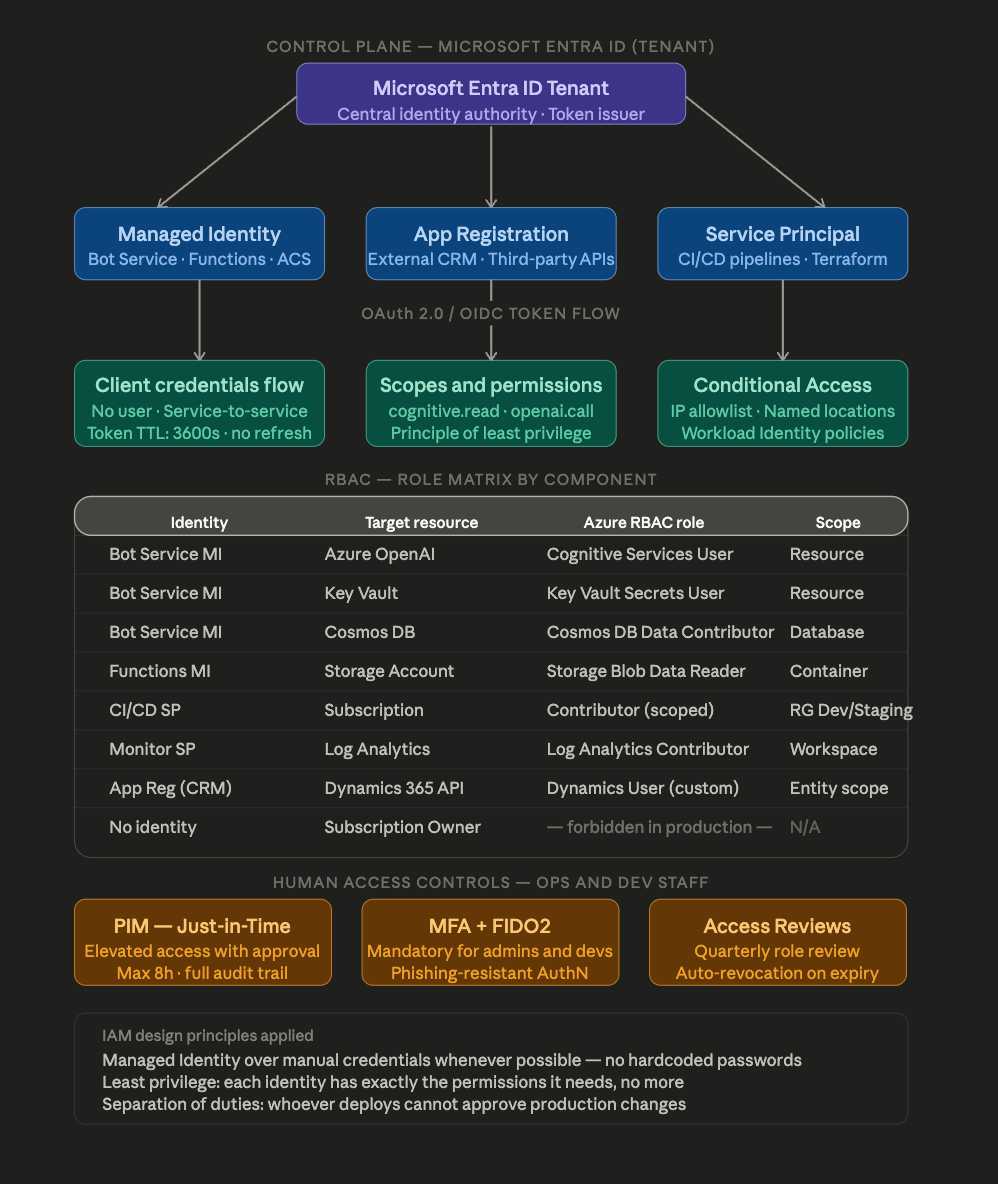
The role matrix is the most important artifact that any well-governed project produces. In most of the implementations I’ve seen fail in auditing, the problem wasn’t a lack of security, but that no one had documented who has access to what with what minimum permission. The result is always the same: accrued privileges, service accounts with subscription-level Owner , and no way to know if someone abused that access.
For the voicebot, the rule of thumb is: no service identity (bot, functions, CI/CD pipelines) should have permissions that a human can physically abuse if the identity is compromised. A bot that can only read from Cosmos DB and call OpenAI cannot exfiltrate infrastructure configuration or create new resources, even if it is compromised.
Privileged Identity Management (PIM) deserves special attention. Instead of permanently assigning Contributor or Owner roles to people, PIM makes them eligible: when an admin needs elevated access, they request it, they need to justify it, and someone else approves it. Access expires automatically in a few hours and everything is logged. This eliminates the attack surface of forgotten accounts with excessive permissions.
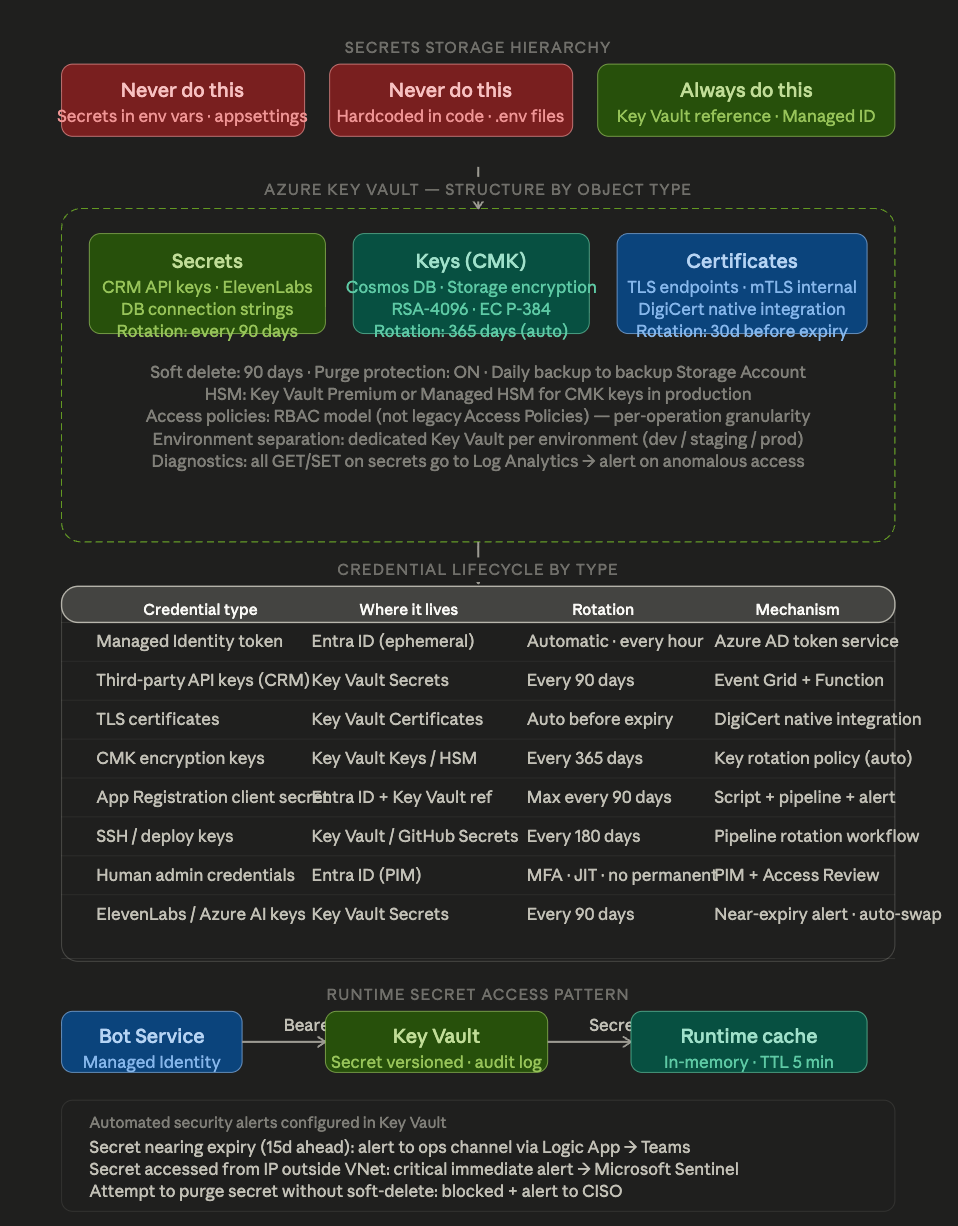
Blueprint 3 — Secrets, Credentials, and Keys Management
The third diagram shows the secret hierarchy and lifecycle of each type of credential.
How the three planes are connected: the complete security flow
When the bot boots into production, this is the exact sequence of security operations that occur before it can process a single call:
- The Bot Service process starts in your subnet within the VNet. It has no credentials on disk or in environment variables.
- The runtime requests an OAuth 2.0 token from the Entra ID endpoint using its Managed Identity (client_credentials passwordless flow ). Enter ID validates the identity against the registered Principal Service and issues a JWT token with limited scope.
- The bot uses that token to authenticate against Key Vault and read the API key secret from the external CRM. Key Vault logs access in your audit log.
- The API key caches in memory for 5 minutes. When it expires, it refreshes from Key Vault. He never plays a record.
- All outbound calls from the bot go through Azure Firewall Premium, which inspects TLS traffic (with internal intercept certificate), validates that the destination is an allowed FQDN, and logs the session.
- NSG, Firewall, and Key Vault logs flow in real-time to Log Analytics. Microsoft Sentinel runs correlation rules: if the bot makes more than N calls to OpenAI per minute, if it accesses a secret from an unexpected IP, or if there is a burst of authentication errors, it triggers alerts.
What to put in the appsettings.json and what not to put
Here is the most common mistake in real projects:
- JSON
- WRONG — never like this
- {
- “OpenAI”: {
- “ApiKey”: “sk-proj-abc123…” hardcoded en config
- }
- }
- CORRECT — Key Vault reference
- {
- “OpenAI”: {
- “ApiKey”: “@Microsoft.KeyVault(SecretUri=https://kv-voicebot-prod.vault.azure.net/secrets/openai-key/)”
- }
- }
The second pattern works natively in Azure App Service and Azure Functions: the runtime resolves the reference to configuration load time, the value never appears in the source code or configuration logs.
The Rule of the Three Key Vaults
For a project in real production, it is recommended to separate it into three instances:
kv-voicebot-dev — development secrets, wide access to the computer, no purge protection, lax rotation.
kv-voicebot-staging — production mirror but with test environment credentials, restricted access to CI/CD.
kv-voicebot-prod — human access only via PIM with approval, purge protection enabled, HSM for CMK keys, full diagnostics, no developer has permanent access.
This separation prevents a developer with access to dev from being able to, accidentally or intentionally, read production secrets.
Compliance checklist for audit
If you were to answer a security audit questionnaire for this architecture, here are the controls you can mark as implemented:
| Control | Mechanism | Status |
| Passwordless authentication between services | Managed Identities | Implemented |
| Encryption in transit | TLS 1.3 on all hops | Implemented |
| Encryption at rest with your own key | CMK via Key Vault Premium | Implemented |
| Least-Privilege Access | Granular RBAC by Resource | Implemented |
| Automatic credential rotation | Key Vault + Event Grid | Implemented |
| Temporary elevated access with approval | PIM Just-in-Time | Implemented |
| Phishing-resistant MFA for admins | FIDO2 / Authenticator | Implemented |
| Complete log of access to secrets | Key Vault Diagnostic Logs | Implemented |
| Anomaly and SIEM detection | Microsoft Sentinel | Implemented |
| Network Segmentation with Private Endpoints | VNet + NSG + Private DNS | Implemented |
| Biometric Data Protection (Voice) | Purview + data residency policy | Configure by regulation |
| Periodic access review | Enter ID Access Reviews | Quarterly |
The architecture described is not theory — it is a proven standard that meets the audit requirements of ISO 27001, SOC 2 Type II, and NIST RMF when implemented correctly. The secret is not in the products but in the discipline of configuring them with intention, without shortcuts, and with living documentation to demonstrate that each control exists and works.
Thanks for reading me!!!





Leave a Reply